Over the past four weeks, a small group of beta testers have been using Djangify and giving real feedback on what works, what's missing, and what could be better. The result is a substantial set of improvements that make the platform more capable, more search-ready, and easier to use. Here's everything that was added.
Page Preview Links
Every page in the admin now has a Preview link. You can preview any page, including unpublished ones, directly from the admin list without having to navigate to the live URL manually. A yellow banner appears at the top of the preview so there is no confusion between a draft and a live page. This applies to all page types: home, about, custom pages, landing pages, and blog posts.
E-E-A-T Author Profile in Site Settings
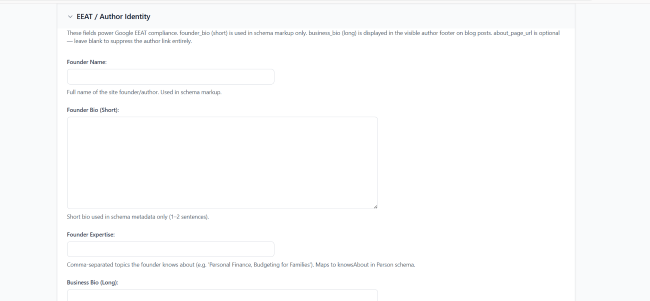
A new E-E-A-T / Author Identity section has been added to Site Settings. E-E-A-T stands for Experience, Expertise, Authoritativeness, and Trustworthiness - the framework Google uses to assess the credibility of a site and its content.
You can now fill in:
- Founder Name - your full name as it appears publicly
- Founder Bio - a short 1–3 sentence bio that Google uses in schema markup
- Founder Expertise - comma-separated topics you are known for (e.g. Personal Finance, Budgeting for Families, Debt Payoff)
- Founding Year - the year you launched your site or business
- Your Public Profiles & Links - one URL per line for every place you appear online: LinkedIn, YouTube, Pinterest, personal website, press mentions
- About Page URL - a link to your About page so Google can connect your author identity to a real page on your site
The more of these you complete, the stronger your authority signal in search results. Google cross-references the profile links to confirm you are a real, credible person behind the content — not an anonymous AI-generated site.
Author Bio on Every Blog Post
Connected to the E-E-A-T settings above, every blog post now automatically displays an author bio footer at the bottom of the article. If you have filled in your Founder Name and Founder Bio in Site Settings, it appears below your content with a clean "Written by" heading and an optional link through to your About page.
This is visible to readers and to Google, and it reinforces the credibility of your content every time someone reads an article on your store.
Schema Markup for Search and AI Discovery
Two types of structured data (schema markup) are now output on every blog post:
Article Schema - tells Google and AI search tools that the page is an article, who wrote it, when it was published, and what the content covers. This improves how your posts are understood and displayed in search results.
BreadcrumbList Schema - tells Google the hierarchy of the page: Home → Blog → Category → Article. This enables breadcrumb trails to appear directly in search results, which improves click-through rates.
Additionally, blog post pages now include AI-specific meta tags (ai-page-type and ai-topics) so that AI search tools like Perplexity and Google's AI Overviews can correctly classify and surface your content.
Open Graph / Social Sharing Fix
When you shared a product or blog post URL on social media, the preview was showing raw HTML tags instead of clean text. This has been fixed. Links now preview correctly on LinkedIn, Facebook, WhatsApp, and anywhere else that reads Open Graph tags — showing the right title, description, and image.
Default Fallback Image for Blog Posts
Previously, if a blog post had no image attached, the layout showed a blank space. Blog posts without an image now display a clean neutral placeholder image instead, keeping the blog listing page consistent regardless of whether every post has a photo.
Gallery Improvements
The gallery feature received several updates based on beta feedback:
- Pinterest buttons now link correctly with the full absolute image URL, so pins are properly associated with your page
- Caption overlays now appear on hover over gallery images, with a smooth fade transition
- Captions and Pinterest buttons are included in the gallery modal when you click to expand an image
- Clicking the backdrop behind a modal now closes it, which was not working before due to a JavaScript conflict that has been resolved
Coupon System
Store owners can now create discount coupons in the admin and customers can apply them at checkout. Coupons support percentage-based discounts and can be set as active or inactive. When a coupon is applied:
- The discount is shown at checkout before payment
- The coupon code and discount amount are saved against the order
- The success page shows the discount that was applied
- The order history shows the correct discounted amount
Order Bumps at Checkout
An order bump is an additional product offer shown at the point of checkout a low-friction way to increase the value of each sale. Store owners can now create Order Bumps in the admin by choosing a trigger product (what the customer must have in their cart) and a bump product (what is offered).
When a customer accepts the bump, a green confirmation strip appears with a visible Remove option if they change their mind. The bump product must have a downloadable file attached - products without files cannot be offered as bumps.
Customer Support Contact Form — Confirmation Email
When a customer submits a support message through the contact form, they now receive an automatic confirmation email containing a copy of their message. This gives customers confidence their query was received and gives them a reference of what they sent.
Registration Webhook for Email List Integration
Store owners can now connect Djangify to any email provider or automation tool. When a new user registers or completes a purchase, Djangify can automatically POST their details to a configurable webhook URL. This works with Mailerlite, Aweber, Make, or any custom endpoint — no lock-in to a single provider.
Programmatic SEO (pSEO) — New App
A brand new app has been added for generating keyword-targeted landing pages at scale. This is for store owners who want to appear in search results for many specific phrases without writing every page manually.
How it works:
- Write a master template once, using
[Topic]as a placeholder - Import a CSV of keywords
- Use the bulk Generate Content action in admin to produce individual pages, each with the keyword swapped in throughout
- Each page gets its own slug, meta title, and meta description
- A Preview button in admin lets you view any page before publishing
- Published pages are included in the sitemap automatically
- A daily cron job handles scheduled publishing
Updated Logged-In Header
The header shown to logged-in users has been updated with a cleaner account display so people know they are already logged in:
- A coloured circle showing the user's initial
- Display name and email visible in the dropdown
- A direct Dashboard button for faster navigation
If you are on managed hosting and have feedback or have spotted something that could work better contact support through the dashboard area or in the Skool group.